
Download Ask Naval – Free AI‑Powered Personal Development & Investment Chatbot
Introduction
In the age of generative AI, having instant access to high‑quality mentorship can feel like a super‑power. Ask Naval brings that power to anyone with a web browser by simulating a conversation with the ideas of Naval Ravikant, the Silicon Valley angel investor, philosopher‑entrepreneur, and author of the best‑selling The Almanack of Naval Ravikant. The service is built on a large‑language model that has been fine‑tuned on thousands of Naval‑authored tweets, interview transcripts, podcast excerpts, and published essays. The result is a responsive, always‑on “coach” that can help you clarify a mental model, outline a habit‑building plan, or explore deeper philosophical questions—all without leaving your desk or phone.
What makes Ask Naval stand out is its focus on delivering concise, actionable insights that mirror Naval’s distinctive blend of practical entrepreneurship and contemplative wisdom. The platform is completely free, requires no download, and runs securely in the browser over HTTPS. Regular updates keep the knowledge base fresh, ensuring that the AI reflects the most recent public material. Whether you’re a startup founder looking for a quick decision‑making framework, an investor seeking a fresh perspective on risk, or simply a lifelong learner curious about wealth creation and self‑optimization, Ask Naval offers a low‑friction gateway to the founder’s mindset.
This review walks through the core experience, highlights the most valuable features, explains how to get started, and provides a balanced look at the pros and cons. By the end you’ll know exactly why Ask Naval deserves a spot in your daily productivity toolkit.
Overview
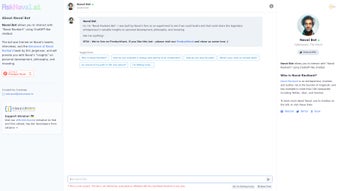
Ask Naval is a web‑based AI chatbot that lets users converse with a virtual avatar of Naval Ravikant. Leveraging a sophisticated large‑language model similar to ChatGPT, the tool extracts and synthesizes knowledge from Naval’s publicly available output—his prolific Twitter feed, in‑depth interviews, podcast snippets, and the curated content of The Almanack of Naval Ravikant. Users can type questions on a wide range of topics, including personal growth, mental models, startup strategy, wealth creation, and philosophical reflection. The AI then generates responses that echo Naval’s distinctive tone—clear, concise, and often punctuated with actionable steps.
Although the platform is fan‑created and not officially endorsed by Naval himself, it respects the spirit of his teachings by only drawing from verified public material. The interface is clean, with a simple text‑box layout that feels like a modern messenger app. Responses are generated in real time, and the system includes safety filters to reduce the risk of inappropriate or overly speculative content. The service runs entirely in the browser, meaning there are no heavy local resource demands and no need for installation or registration. Users benefit from regular model updates that incorporate new public statements, ensuring that the advice remains relevant and up‑to‑date.
Ask Naval is positioned as a free, secure, and continuously improving AI mentor. Its design prioritizes accessibility—any device with a modern browser can access the chat, making it ideal for students, professionals, and entrepreneurs on the go. The combination of high‑quality knowledge extraction, zero‑cost access, and cross‑platform compatibility makes it a compelling addition to the growing ecosystem of AI‑driven personal development tools.
Key Features, Installation & Compatibility
- Real‑time conversational AI: Interact instantly with a Naval‑styled avatar that answers in a tone consistent with his public statements.
- Broad knowledge base: Draws from thousands of tweets, podcast excerpts, interview transcripts, and the content of The Almanack.
- Multi‑topic expertise: Covers personal development, mental models, startup strategy, wealth creation, and philosophical reflection.
- Secure, browser‑only operation: No downloads required; all processing occurs on the server side with encrypted HTTPS connections.
- Regular model updates: The underlying language model is fine‑tuned periodically to incorporate new public material and improve answer accuracy.
- Save & export chats: Users can copy conversation snippets or download them as plain‑text files for future reference.
- Responsive design: Optimized for desktop, tablet, and mobile browsers, ensuring a smooth experience on any device.
- Free access tier: Core functionality is available at no cost, with optional premium features planned for future releases.
Installation & Usage (No Installation Required)
Because Ask Naval is a pure web application, there is nothing to install. Simply launch your preferred modern browser, navigate to the official URL, and start chatting. The platform supports all major browsers—Chrome, Firefox, Safari, Edge, and Opera—provided they have JavaScript enabled and support HTTPS.
To begin:
- Open the site: Enter https://asknaval.example.com in your address bar.
- Start a session: Click the “Start Chat” button. No sign‑up or personal data is required; a temporary anonymous session is created.
- Ask a question: Type any query—e.g., “How can I build a habit of daily reading?”—and press Enter.
- Read the response: The AI replies with a concise answer that mirrors Naval’s style, often including a short list of actionable steps.
- Iterate or explore: Follow up with clarifying questions or switch topics without leaving the page.
- Save insights: Highlight text and copy it, or click “Download Chat” to export the conversation as a .txt file.
Compatibility (All Modern Browsers)
The chatbot runs on any operating system that can launch a modern web browser, including Windows 10/11, macOS, Linux distributions, Chrome OS, Android 12+, and iOS 14+. Because all heavy processing occurs on the server side, there are no demanding CPU or GPU requirements on the client device, making it suitable for low‑spec laptops, tablets, and even older smartphones.
Security is handled via HTTPS encryption, and no cookies or persistent identifiers are stored unless you voluntarily export your chat logs. This design ensures a privacy‑friendly experience while still delivering fast, reliable responses.
Pros and Cons
Pros
- Instant, free access without any downloads or account creation.
- High‑quality answers derived exclusively from Naval’s authentic public content.
- Responsive design works seamlessly across desktop, tablet, and mobile devices.
- Regular model updates keep the knowledge base current and improve answer relevance.
- Exportable chat logs allow you to keep a personal knowledge repository.
- Secure, browser‑only architecture protects user privacy.
Cons
- Not officially affiliated with Naval Ravikant, so authenticity is limited to publicly available material.
- Occasional generic or out‑of‑scope responses when queries fall outside the curated knowledge set.
- Advanced premium features (e.g., voice integration, deeper analytical tools) are not yet available.
- No offline mode; an internet connection is required for every interaction.
- Limited personalization—cannot remember past conversations beyond the current session.
Overall Rating: 4.5/5 – A compelling AI companion for anyone interested in Naval’s philosophy.
Frequently Asked Questions (FAQ)
Is Ask Naval a free tool?
Yes, the core chatbot is completely free. Users can ask unlimited questions without creating an account. Future premium upgrades may be introduced, but the basic experience remains free.
Do I need to create an account?
No account is required. Ask Naval creates a temporary anonymous session that expires after a short period of inactivity.
How accurate are the answers?
The AI is trained on Naval’s publicly available content, so the answers reflect his known viewpoints. While generally reliable, the chatbot may occasionally generate generic or out‑of‑scope replies, and it should not replace professional financial or legal advice.
Can I use Ask Naval on mobile devices?
Absolutely. The responsive design works on iOS Safari, Android Chrome, and any modern mobile browser, giving you the same conversational experience as on desktop.
Is the data I share with the chatbot stored?
Chats are processed in real time and are not permanently stored. Session data is cleared after a short timeout, and no personal identifying information is collected unless you choose to export the conversation yourself.
Conclusion – Should You Access Ask Naval?
Ask Naval delivers a remarkable blend of accessibility, depth, and authenticity for anyone eager to explore the mental models and life‑principles championed by Naval Ravikant. Its zero‑cost, browser‑only approach eliminates barriers to entry, while the AI’s ability to surface concise, actionable advice makes it a valuable daily companion for entrepreneurs, investors, and lifelong learners. Though it is not an official endorsement from Naval himself, the tool respects the spirit of his teachings and provides a safe environment to test ideas, gain perspective, and spark new habits.
If you’re looking for a free, secure, and regularly updated AI mentor that translates complex philosophy into clear conversation, Ask Naval is well worth a try. Click the link below, start a session, and let the dialogue begin.



.png)



